






Questions about product
How do you put the UPS into operation?
Once the equipment is plugged into the mains, the UPS starts in Bypass mode, to put the equipment in Line mode, press the ON/OFF button for 3 seconds.
What does it mean that the UPS is in Bypass mode?
Equipment in operation, supplies direct output voltage from the input network. In the event of a power outage, the equipment will stop.
When the UPS is configured as CF (Frequency Converter), is the bypass disabled?
YES, in this mode, the Static Bypass is disabled by the condition of disparate input and output frequencies.
Do you have a manual maintenance bypass?
No, it is an optional item.
Can we start the equipment without input voltage?
YES, since it has Cold Start, pressing the ON/OFF button for 1 second, pressing on-off again for 1 second, the equipment will start and voltage the output in battery mode.
To install the equipment in a rack, do you have side guides?
YES, the equipment comes prepared with side guides and screws. It also has side fins for installation in a rack cabinet
Is the display rotating?
Yes. Press the tabs on both sides of the LCD to remove it and pull it to unlock its movement and Rotate the LCD 90
How many battery modules does the UPS allow us to add?
Up to 4 EBM modules can be connected to the UPS, in series using the built-in RJ-45 and power cables.
Can RS-232 and USB ports be used at the same time?
It is not possible to use both ports at the same time.
What mode is the RPO output in?
The RPO output is an NC contact, it will perform an emergency stop when the circuit is opened
The equipment has a Nimbus communication card, can an SNMP card be added to it?
Yes, the device has a smart slot to add the SMNP card
What is equipment monitoring software?
The software used by the equipment is Winpower, which allows the monitoring and control of the equipment. The program can be downloaded through https://www.salicru.com/viewpower.html
What is the software's activation number?
When the download is complete, enter the activation number 511C1-01220-0100-478DF2A for the installation of the software.
What are the current and short-circuit protection devices?
A 10A circuit breaker is recommended for 1000vA and 1500vA models, and 16A for the 2000vA and 3000vA models.
How do you completely stop the UPS?
Press and hold the on/off button for 3 seconds, the buzzer will sound once. The UPS enters Bypass mode, and immediately after the power cord must be disconnected, and the equipment is turned off.
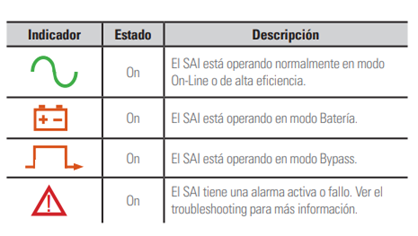
What do the colors on the display mean?
What is the default password?
The default password is 0000, can be changed/disabled by the user
Can it be activated in ECO mode?
Yes, if the input voltage is within the margins, the UPS will supply the output voltage of the bypass.
When does the equipment go into bypass mode?
When the input voltage is within the margins but the UPS is overloaded, the system will automatically transfer to Bypass mode, it is also possible to transfer to this mode through the front panel.
Can we perform a battery test?
Yes, the equipment allows an automatic battery test, which is executed only when the UPS is in inverter mode.
Can the batteries be changed to the equipment?
Yes, verify that replacement batteries have the same rating and marking as replaced batteries.
How do you put the UPS into operation?
Once the equipment is plugged into the mains, the UPS starts in Bypass mode, to put the equipment in Line mode, press the ON/OFF button for 3 seconds.
What does it mean that the UPS is in Bypass mode?
Equipment in operation, supplies direct output voltage from the input network. In the event of a power outage, the equipment will stop.
When the UPS is configured as CF (Frequency Converter), is the bypass disabled?
YES, in this mode, the Static Bypass is disabled by the condition of disparate input and output frequencies.
Do you have a manual maintenance bypass?
No, it is an optional item.
Can we start the equipment without input voltage?
YES, since it has Cold Start, pressing the ON/OFF button for 1 second, pressing on-off again for 1 second, the equipment will start and voltage the output in battery mode.
To install the equipment in a rack, do you have side guides?
YES, the equipment comes prepared with side guides and screws. It also has side fins for installation in a rack cabinet
Is the display rotating?
Yes. Press the tabs on both sides of the LCD to remove it and pull it to unlock its movement and Rotate the LCD 90
How many battery modules does the UPS allow us to add?
Up to 4 EBM modules can be connected to the UPS, in series using the built-in RJ-45 and power cables.
Can RS-232 and USB ports be used at the same time?
It is not possible to use both ports at the same time.
What mode is the RPO output in?
The RPO output is an NC contact, it will perform an emergency stop when the circuit is opened
The equipment has a Nimbus communication card, can an SNMP card be added to it?
Yes, the device has a smart slot to add the SMNP card
What is equipment monitoring software?
The software used by the equipment is Winpower, which allows the monitoring and control of the equipment. The program can be downloaded through https://www.salicru.com/viewpower.html
What is the software's activation number?
When the download is complete, enter the activation number 511C1-01220-0100-478DF2A for the installation of the software.
What are the current and short-circuit protection devices?
A 10A circuit breaker is recommended for 1000vA and 1500vA models, and 16A for the 2000vA and 3000vA models.
How do you completely stop the UPS?
Press and hold the on/off button for 3 seconds, the buzzer will sound once. The UPS enters Bypass mode, and immediately after the power cord must be disconnected, and the equipment is turned off.
What do the colors on the display mean?

What is the default password?
The default password is 0000, can be changed/disabled by the user
Can it be activated in ECO mode?
Yes, if the input voltage is within the margins, the UPS will supply the output voltage of the bypass.
When does the equipment go into bypass mode?
When the input voltage is within the margins but the UPS is overloaded, the system will automatically transfer to Bypass mode, it is also possible to transfer to this mode through the front panel.
Can we perform a battery test?
Yes, the equipment allows an automatic battery test, which is executed only when the UPS is in inverter mode.
Can the batteries be changed to the equipment?
Yes, verify that replacement batteries have the same rating and marking as replaced batteries.
Not found your solution?


 MONTAWEB.com
Welcome to Salicru. Select country/language
Armenia English
Belarus English
Bulgaria English
Croatia English
Cyprus English
Czech Republic English
Denmark English
Estonia English
Finland English
France Français
Georgia English
Greece English
Hungary English
Ireland English
Italy English
Latvia English
Lithuania English
Malta English
Netherlands English
Norway English
Poland English
Portugal Português
Romania English
Russia English
Serbia English
Slovakia English
Sweden English
Ukraine English
United Kingdom English
extralarge
large
tablet
mobile
We use proprietary and third-party cookies to keep track of how our website is used and to be able to improve it,
adapt the content to your tastes and personalise our advertising, marketing and social media posts.
Click on the corresponding buttons to accept all of them, reject them or configure your settings.
Please see our Cookie Policy for more information.